Races and Events – Race Targets

Picture of runners waiting to start an event

𝐑𝐚𝐜𝐞𝐬 & 𝐄𝐯𝐞𝐧𝐭𝐬 – 𝐑𝐚𝐜𝐞 𝐓𝐚𝐫𝐠𝐞𝐭𝐬

If you’re like I was (before power), your race target is a goal time: “I’d love to break 1 hour for the 10k”, or “… 2 hours for a half”.

You may have used online calculators to put in a 5k time (or an 800m time) to see what your equivalent 10k or half time would be.

And then when you ran the event, you struggled to achieve the predicted time … because it was more ‘hopeful’ than a prediction, based on using a single data point with data averaged across thousands of runners, many of whom are nothing like you.

𝐏𝐨𝐰𝐞𝐫 𝐭𝐚𝐫𝐠𝐞𝐭𝐬 𝐚𝐫𝐞 𝐝𝐢𝐟𝐟𝐞𝐫𝐞𝐧𝐭

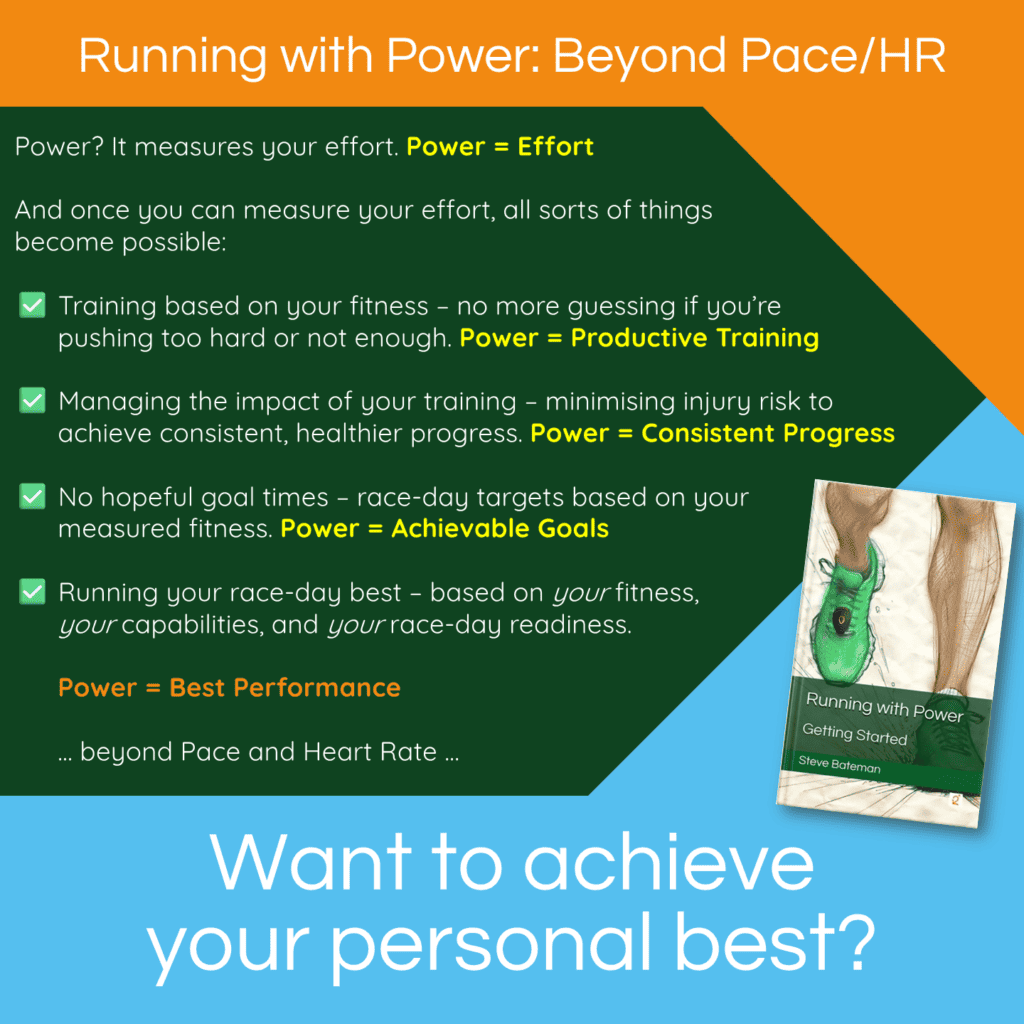
Event targets when running with power are based on:
✅ your current running fitness
✅ your measured fatigue resistance (or stamina)
✅ your proven ability to convert effort into forward motion

All three (metrics) are based on your completed workouts and are individual to you.

𝐇𝐨𝐰 𝐚𝐫𝐞 𝐫𝐚𝐜𝐞 𝐭𝐚𝐫𝐠𝐞𝐭𝐬 𝐜𝐚𝐥𝐜𝐮𝐥𝐚𝐭𝐞𝐝?

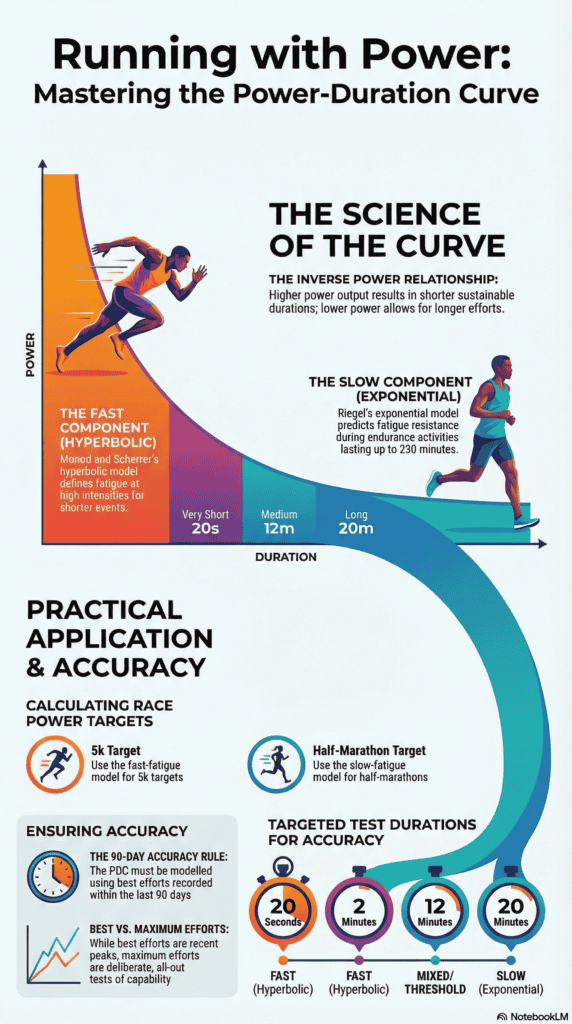
If you use a Stryd footpod, you have access to the Stryd Race Power Calculator. The calculator will prompt you for the information needed for the calculation.

If you don’t use a Stryd footpod (or even if you do), you also have access to SuperPower Calculator for Sheets (SPCs). Steve Palladino has recorded several videos showing how to use SPCs to calculate race scenarios.

𝐍𝐨 𝐦𝐨𝐫𝐞 ‘𝐡𝐨𝐩𝐞𝐟𝐮𝐥’ 𝐠𝐨𝐚𝐥 𝐭𝐢𝐦𝐞𝐬

Race power targets represent the effort you should be able to maintain for the entire event. The calculators can also provide an estimated finish time, but this is an estimation – instead, run to effort … and let the time take care of itself.

𝑺𝒉𝒐𝒖𝒍𝒅𝒏’𝒕 𝒚𝒐𝒖 𝒃𝒆 𝑹𝒖𝒏𝒏𝒊𝒏𝒈 𝒘𝒊𝒕𝒉 𝑷𝒐𝒘𝒆𝒓?
Questions?
📖 Getting Started

More about the Race Calculators can be found at:
🔹 Stryd: Race Power Calculator in PowerCenter
🔹 SuperPower Calculator for Sheets (click to download a copy)
Steve Palladino’s videos are on YouTube

Races & Events – Race Targets

Races and Events – with Power

Picture of runners waiting to start an event

𝐑𝐚𝐜𝐞𝐬 & 𝐄𝐯𝐞𝐧𝐭𝐬 – 𝐰𝐢𝐭𝐡 𝐏𝐨𝐰𝐞𝐫

Races & Events are a little different when Running with Power.

The next few posts will dig into the detail, but in summary (and as a taster):
⚡ Your race-day power target is based on your fitness and capabilities
⚡ Tapering uses power-based metrics to determine when and how to taper
⚡ On the day, your target is your target for the entire event (no adjustments needed)
⚡ You won’t be able to (or need to) run with pacers
⚡ You’ll run to power, to achieve your personal best on the day

This is quite different than:
❌ looking up a hopeful goal time from a table compiled using data from thousands of runners (many of whom are nothing like you)
❌ tapering for a period and approach determined using general guidelines
❌ wearing a wrist band telling you your pace (per mile or kilometre) based on whether the section is uphill, downhill or flat
❌ going out too fast and suffering the consequences later in the event
❌ trying to keep up with pacers to achieve your hopeful goal time

It takes a little getting used to.

Especially the part about running to a power target rather than a (hopeful) goal time.

But this effort-based approach has been proven hundreds of times and has produced many unexpected personal bests.

𝑺𝒉𝒐𝒖𝒍𝒅𝒏’𝒕 𝒚𝒐𝒖 𝒃𝒆 𝑹𝒖𝒏𝒏𝒊𝒏𝒈 𝒘𝒊𝒕𝒉 𝑷𝒐𝒘𝒆𝒓?

Questions?
📖 Getting Started

Racing & Events – with Power

Power Apps – point solutions

Power apps - calculating metrics

𝐏𝐨𝐰𝐞𝐫 𝐀𝐩𝐩𝐬 – 𝐩𝐨𝐢𝐧𝐭 𝐬𝐨𝐥𝐮𝐭𝐢𝐨𝐧𝐬

Power is still relatively new for runners. And while there are some apps that cover most of the important metrics, you may find that you need additional apps to plug the gaps.

Here are a few apps that can fill those gaps.

𝐔𝐬𝐢𝐧𝐠 𝐀𝐩𝐩𝐥𝐞 𝐰𝐫𝐢𝐬𝐭-𝐛𝐚𝐬𝐞𝐝 𝐩𝐨𝐰𝐞𝐫

Apple Health doesn’t provide any of the important metrics.

Which means you’ll need to transfer your workout data from Apple Health into an app that can provide these, like WKO or Intervals.icu.

There are a few apps that will do this. I’ve successfully used HealthFit; other options are RunGap or Health Sync.

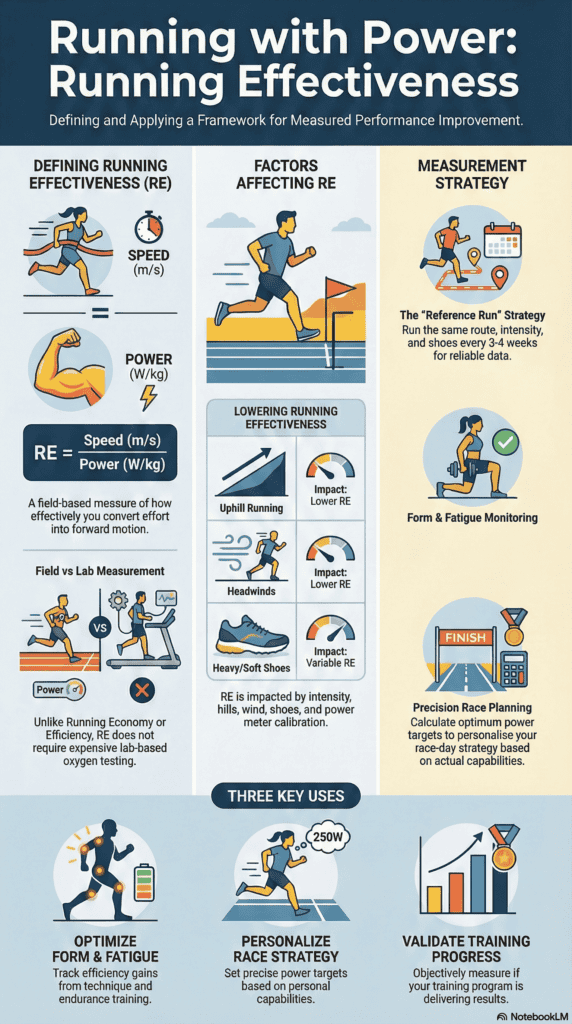
𝐑𝐮𝐧𝐧𝐢𝐧𝐠 𝐄𝐟𝐟𝐞𝐜𝐭𝐢𝐯𝐞𝐧𝐞𝐬𝐬 (𝐑𝐄)

The only app to provide this (natively) is WKO.

If you’re a Stryd user, or if you’re using Intervals.icu, you’ll need to calculate RE manually or use SuperPower Calculator for Sheets (SPCs).

Steve Palladino’s video ‘Running Effectiveness and the SuperPower Calculator’ demonstrates how to use SPCs to calculate RE for a workout or a workout section.

𝐎𝐭𝐡𝐞𝐫 𝐚𝐩𝐩𝐬

‘Getting Started’ covers other apps that can calculate power metrics, while the book’s online content provides a more complete comparison of Power Apps.

𝑺𝒉𝒐𝒖𝒍𝒅𝒏’𝒕 𝒚𝒐𝒖 𝒃𝒆 𝑹𝒖𝒏𝒏𝒊𝒏𝒈 𝒘𝒊𝒕𝒉 𝑷𝒐𝒘𝒆𝒓?
Questions?
📖 Getting Started

point solutions

Power Apps – Intervals.icu

Power apps - calculating metrics

𝐏𝐨𝐰𝐞𝐫 𝐀𝐩𝐩𝐬 – 𝐈𝐧𝐭𝐞𝐫𝐯𝐚𝐥𝐬.𝐢𝐜𝐮

Intervals.icu analyses your rides, runs, swims and other activities (with and without power). It provides basic and advanced analytics and planning in an easy-to-use web interface with support for desktops, phones, and tablets. Intervals.icu is free to use, with additional features should you choose to subscribe.

It can calculate and display all the most important metrics … and then some.

𝐈𝐧𝐭𝐞𝐫𝐯𝐚𝐥𝐬.𝐢𝐜𝐮 𝐌𝐞𝐭𝐫𝐢𝐜𝐬

✅ Threshold Power. Intervals.icu can calculate threshold power (using your choice from several models) based on the last 90 days of completed workouts or using a custom date range.

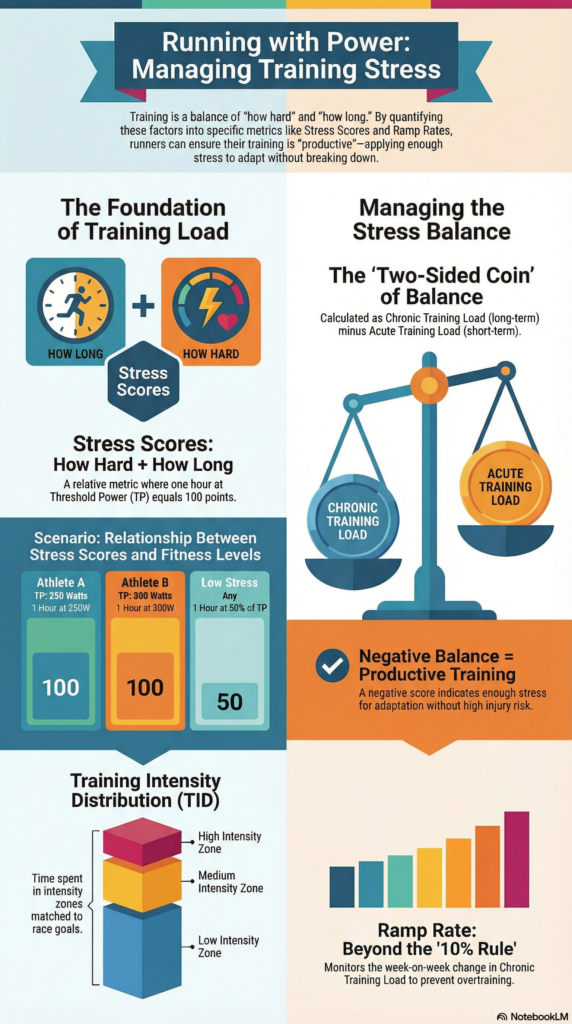
✅ Stress Score. Intervals.icu uses the term ‘Training Stress Score’ (TSS) and can calculate a power-based TSS for each completed workout.

✅ Stress Balance. Intervals.icu uses the term ‘Form’ to show the balance between ‘Fitness’ and ‘Fatigue’.

✅ Ramp Rate. Intervals.icu shows your week-on-week Ramp Rate (RR), overlaid onto the same chart as fitness, fatigue and form.

✅ Running Effectiveness. Intervals.icu doesn’t calculate Running Effectiveness, although you can manually calculate this using the detailed workout review pages, or by adding a custom calculation.

𝐖𝐡𝐲 𝐮𝐬𝐞 𝐈𝐧𝐭𝐞𝐫𝐯𝐚𝐥𝐬.𝐢𝐜𝐮?

If you’re not using the Stryd ecosystem or TrainingPeaks/WKO, Intervals.icu is a great way to track your power metrics.

Getting Started’ covers other apps that can calculate power metrics, while the book’s online content provides a more complete comparison of Intervals.icu vs. other Power Apps.

𝑺𝒉𝒐𝒖𝒍𝒅𝒏’𝒕 𝒚𝒐𝒖 𝒃𝒆 𝑹𝒖𝒏𝒏𝒊𝒏𝒈 𝒘𝒊𝒕𝒉 𝑷𝒐𝒘𝒆𝒓?

Questions?
📖 Getting Started

WKO

Intervals.icu

Power Apps – WKO

Power apps - calculating metrics

𝐏𝐨𝐰𝐞𝐫 𝐀𝐩𝐩𝐬 – 𝐖𝐊𝐎

The WKO app is an analysis and charting tool that runs under MS Windows or on a Mac and provides a wide range of charts and graphs of your power data.

It can calculate and display all the most important metrics … and then some.

𝐖𝐊𝐎 𝐌𝐞𝐭𝐫𝐢𝐜𝐬

✅ Threshold Power. WKO uses the term ‘Functional Threshold Power’ (FTP) and offers an automatically calculated FTP, as well as the option to manually record your FTP history (and use it in charts).

✅ Stress Score. WKO uses the term ‘Training Stress Score’ (TSS).

✅ Stress Balance. WKO uses the term ‘Training Stress Balance’ (TSB).

✅ Ramp Rate. WKO can chart your week-on-week Ramp Rate (RR).

✅ Running Effectiveness. WKO can show your Running Effectiveness (RE) for an entire workout or just for part of a workout (e.g. an interval).

𝐖𝐡𝐲 𝐮𝐬𝐞 𝐖𝐊𝐎?

WKO comes with hundreds of pre-configured charts. You can also build your own charts and calculated metrics using a powerful charting language. WKO integrates seamlessly with TrainingPeaks, syncing planned and completed workout data and a range of health metrics.

Getting Started’ covers other apps that can calculate power metrics, while the book’s online content provides a more complete comparison of WKO vs. other Power Apps.

𝑺𝒉𝒐𝒖𝒍𝒅𝒏’𝒕 𝒚𝒐𝒖 𝒃𝒆 𝑹𝒖𝒏𝒏𝒊𝒏𝒈 𝒘𝒊𝒕𝒉 𝑷𝒐𝒘𝒆𝒓?
Questions?
📖 Getting Started

Power Apps – Stryd PowerCenter / Stryd Mobile

Power apps - calculating metrics

𝐏𝐨𝐰𝐞𝐫 𝐀𝐩𝐩𝐬 – 𝐒𝐭𝐫𝐲𝐝 𝐏𝐨𝐰𝐞𝐫𝐂𝐞𝐧𝐭𝐞𝐫 / 𝐒𝐭𝐫𝐲𝐝 𝐌𝐨𝐛𝐢𝐥𝐞

The Stryd PowerCenter / Mobile app is available to anyone using a Stryd footpod (most features are free, some need a subscription).

It calculates and displays some (but not all) of the most important metrics.

𝐒𝐭𝐫𝐲𝐝 𝐌𝐞𝐭𝐫𝐢𝐜𝐬

In the following, the term ‘Stryd’ includes Stryd PowerCenter and Stryd Mobile

✅ Threshold Power. Stryd uses the term ‘Critical Power’ (CP) and offers an automatically calculated CP (Auto-CP) as well as a manually-set CP (using various protocols).

✅ Stress Score. Stryd uses the term ‘Running Stress Score’ (RSS) and offers a unique calculation which includes a term representing the additional biomechanical stress put on your body from running (vs. cycling).

✅ Stress Balance. Stryd uses the term ‘Running Stress Balance’ (RSB) and offers guidance for how to interpret your RSB.

❌ Ramp Rate. Stryd does not show your Ramp Rate (RR). You’ll need to calculate RR manually using Stryd’s 42d Avg (in Stryd Mobile) or use another system to track this.

❌ Running Effectiveness. Stryd does not show your Running Effectiveness (RE). You’ll need to calculate RE manually using another system, or use one of Stryd’s alternate metrics – for example Form Power, Leg Spring Stiffness, Impact Loading Rate.

𝐖𝐡𝐲 𝐮𝐬𝐞 𝐒𝐭𝐫𝐲𝐝 𝐏𝐨𝐰𝐞𝐫𝐂𝐞𝐧𝐭𝐫𝐞 / 𝐌𝐨𝐛𝐢𝐥𝐞?

The Stryd ecosystem is probably the most power-friendly app at the moment, designed with power in mind, and aimed at runners who are getting started with power.

Getting Started’ covers systems that can calculate the missing metrics, while the book’s online content provides a more complete comparison of Stryd vs. other Power Apps.

𝑺𝒉𝒐𝒖𝒍𝒅𝒏’𝒕 𝒚𝒐𝒖 𝒃𝒆 𝑹𝒖𝒏𝒏𝒊𝒏𝒈 𝒘𝒊𝒕𝒉 𝑷𝒐𝒘𝒆𝒓?

Questions?
📖 Getting Started

⏪ Choosing Power Apps

Stryd PowerCenter / Stryd Mobile

WKO

Choosing Power Apps

Power apps - calculating metrics

𝐂𝐡𝐨𝐨𝐬𝐢𝐧𝐠 𝐩𝐨𝐰𝐞𝐫 𝐚𝐩𝐩𝐬

Power is a complete system using effort as its fundamental metric.

Power uses your second-by-second effort from completed workouts to calculate metrics that build a detailed picture of your individual running capabilities.

Imagine you run 3 times per week for around an hour each time. That’s 60 pieces of data per minute, 3600 per hour and over 3 runs, over 10,000 pieces of data. That’s a lot of data!

Which is why power relies on power-aware applications (‘apps’) to calculate your metrics.

𝐂𝐚𝐧 𝐲𝐨𝐮 𝐮𝐬𝐞 𝐚𝐧𝐲 𝐚𝐩𝐩?

The choice is yours, but some apps are more power-aware than others, with the best apps able to calculate the most important metrics.

𝐖𝐡𝐢𝐜𝐡 𝐦𝐞𝐭𝐫𝐢𝐜𝐬 𝐚𝐫𝐞 𝐦𝐨𝐬𝐭 𝐢𝐦𝐩𝐨𝐫𝐭𝐚𝐧𝐭?

✅ Threshold Power. Represents your current running fitness.

✅ Stress Score. A score (per workout) that combines ‘how hard?’ and ‘how long?’ to represent the workout’s metabolic stress – its impact on your body.

✅ Stress Balance. Indicates whether your training is ‘productive’  – enough stress to encourage adaptations, but not so much that there is a greater risk of injury or over-training.

✅ Ramp Rate. Replaces ‘the 10% rule’ with a metric based on your training volume and intensity, to monitor whether you’re adding training load too quickly.

✅ Running Effectiveness. Measures how effectively you convert power into speed, used to estimate finish times, to assess changes to your running form and to evaluate your fatigue resistance.

There are other criteria that will influence your choice of apps, but being able to obtain these metrics may be the most important.

𝑺𝒉𝒐𝒖𝒍𝒅𝒏’𝒕 𝒚𝒐𝒖 𝒃𝒆 𝑹𝒖𝒏𝒏𝒊𝒏𝒈 𝒘𝒊𝒕𝒉 𝑷𝒐𝒘𝒆𝒓?

Questions?
📖 Getting Started

Choosing Power Apps

Why Steve runs and coaches with power

Why Steve runs and coaches using power

𝐖𝐡𝐲 𝐝𝐨𝐞𝐬 𝐒𝐭𝐞𝐯𝐞, 𝐚 𝐔𝐊-𝐛𝐚𝐬𝐞𝐝 𝐫𝐮𝐧𝐧𝐞𝐫 𝐚𝐧𝐝 𝐜𝐨𝐚𝐜𝐡, 𝐮𝐬𝐞 𝐩𝐨𝐰𝐞𝐫?

There are two reasons:
⚡ The numbers match how hard you’re working … they just ‘feel right’
🎯 Targets (for training and racing) are based on you … power is personal

Let me unpack those.

𝐓𝐡𝐞 𝐧𝐮𝐦𝐛𝐞𝐫𝐬 𝐦𝐚𝐭𝐜𝐡 𝐡𝐨𝐰 𝐡𝐚𝐫𝐝 𝐲𝐨𝐮’𝐫𝐞 𝐰𝐨𝐫𝐤𝐢𝐧𝐠

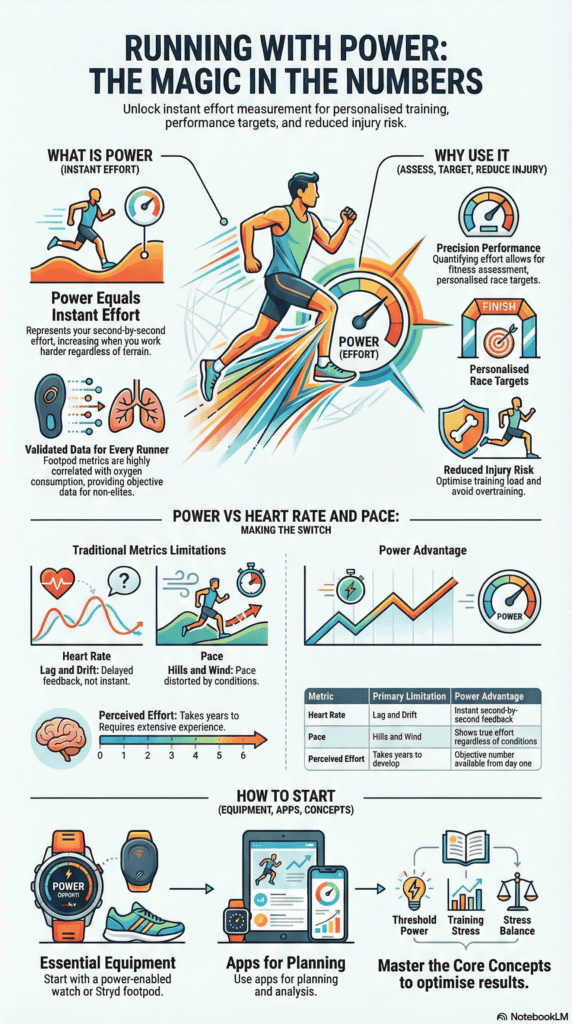
Power provides numbers representing how hard you’re working while running – your effort.

Running by effort isn’t new – runners have used ‘Perceived Exertion’ for many years. What is new is being able to put numbers to your effort.

Are the numbers actionable?

YES, based on using power since 2018 … and on multiple independent studies.

𝐓𝐚𝐫𝐠𝐞𝐭𝐬 𝐚𝐫𝐞 𝐛𝐚𝐬𝐞𝐝 𝐨𝐧 𝐲𝐨𝐮

Once you can measure your effort, all sorts of things become possible – you can:
✅ assess your running fitness at any point in your training
✅ ensure your training stays productive by setting workout targets based on your current fitness, rather than on a hopeful goal time
✅ reduce your risk of injury using completed workouts to track your training load
✅ personalise your race-day targets to achieve the best result you’re capable of on the day

All of these are calculated using your completed workouts. Power really is Personal.

𝐖𝐡𝐚𝐭 𝐝𝐨𝐞𝐬 𝐭𝐡𝐢𝐬 𝐦𝐞𝐚𝐧 𝐟𝐨𝐫 𝐜𝐨𝐚𝐜𝐡𝐢𝐧𝐠?

Using my runners’ completed workouts, I can build a detailed profile of each runner based on what they can achieve (right now). And I can use that profile to set targets that are individual to each runner’s capability (right now), to get the most from their training while minimising injury risk.

I can do all of this virtually, to coach runners in the UK, the US, or any other place worldwide.

Power (and the system behind it) provides a science-backed, metrics-based, individualised approach to training and racing – for runners and for coaches.

𝑺𝒉𝒐𝒖𝒍𝒅𝒏’𝒕 𝒚𝒐𝒖 𝒃𝒆 𝑹𝒖𝒏𝒏𝒊𝒏𝒈 𝒘𝒊𝒕𝒉 𝑷𝒐𝒘𝒆𝒓?

Questions?
📖 Getting Started

Why Steve runs and coaches with power

Why Asya runs with power

Asya, running with power in the US

𝐖𝐡𝐲 𝐝𝐨𝐞𝐬 𝐀𝐬𝐲𝐚 𝐫𝐮𝐧 𝐰𝐢𝐭𝐡 𝐩𝐨𝐰𝐞𝐫?

✅ Initially, I wanted accurate pace and distance

I did not get a power meter to run with power (initially). Mainly, I was frustrated by terrible GPS distance and pace tracking in NYC where I live and run. I knew from past experiences that a foot pod with an accelerometer would be able to get far more precise data about my pace and distance and in my world data is good – hey, I’m an engineer, more data is always better! 🙂

✅ Then I discovered Power=Effort!

It wasn’t till I started reading about training with power on Stryd website that I realized that in addition to pace and distance the pod can measure actual effort which seemed amazing to me and once I realized I could run with steady effort just by sticking to a number, there was no going back. Before long, I signed up for a power-based training program and finished a half-marathon worrying only about power and had the same amazing experience with both training, and racing. 

✅ I know exactly how hard I’m working when running

I’ve been using different power-based programs since and I can’t imagine doing it any other way – I know exactly how hard I’ve been working, and when I can push harder, no matter where I’m running, and as a bonus, the pace and distance measurements are always spot-on.

✅ Every runner should have a ‘coach in a pod’!

Power makes it so much easier to know you’re expending appropriate effort. And don’t be misled by the name – power isn’t just for younger or faster runners, in fact it helps weaker/slower/newer runners even more than experienced fast runners. It’s like having a coach in a pod!

𝑺𝒉𝒐𝒖𝒍𝒅𝒏’𝒕 𝒚𝒐𝒖 𝒃𝒆 𝑹𝒖𝒏𝒏𝒊𝒏𝒈 𝒘𝒊𝒕𝒉 𝑷𝒐𝒘𝒆𝒓?
Questions?
📖 Getting Started

Why Kirke runs with power

Kirke running with power

𝐖𝐡𝐲 𝐝𝐨𝐞𝐬 𝐊𝐢𝐫𝐤𝐞 𝐫𝐮𝐧 𝐰𝐢𝐭𝐡 𝐩𝐨𝐰𝐞𝐫?

✅ Power is an objective and consistent measure of effort.

Power is an estimate of your overall metabolic energy expenditure rate. It doesn’t care about your motivation (or lack of motivation) for a given effort. It isn’t fooled by the surge of adrenaline at the start of a race. And it’s not affected by ego or your competitive instincts.

✅ Power is “portable” across different running conditions.

If you’re running Uphill or downhill, changes in effort due to slope are accounted for. If you’re running into a headwind or with a tailwind, changes in effort due to variations in wind speed and direction are accounted for. If you’re on track, road or trail, power works well across varying running surfaces.

Pace is not very portable, Grade Adjusted Pace (GAP) is more portable but still does not account for varying wind conditions.

Heart Rate is more portable than pace, but subject to environmental conditions, drift, and lag.

✅ Power is responsive.

Changes in intensity are reflected quickly, allowing real-time feedback. And power is much more responsive than heart rate.

✅ Power provides a good structure for training zones, workout targets, and race planning.

Critical Power (CP), Reserve Work Capacity (RWC), and fatigue characteristics derived from maximal efforts can provide an accurate snapshot of a runner’s capabilities. And power history provides an excellent basis for race planning.

✅ Power provides a good basis for tracking running stress and training loads.

Power can find the “sweet spot” between overtraining and injury (by increasing load too fast) and stimulating performance improvements (by increasing load fast enough).

𝑺𝒉𝒐𝒖𝒍𝒅𝒏’𝒕 𝒚𝒐𝒖 𝒃𝒆 𝑹𝒖𝒏𝒏𝒊𝒏𝒈 𝒘𝒊𝒕𝒉 𝑷𝒐𝒘𝒆𝒓?

Questions?
📖 Getting Started

Why Kirke runs with power