
Why do you need apps?
This content (and more) is included in Running with Power – Getting Started.
Apps enable you to make the most of your power meter and watch. They enable you to plan, execute and review your workouts, and to monitor your training.
Your choice of apps may depend on your choice of power meter:
- If you’re using the Stryd footpod, it’s likely the Stryd Ecosystem will meet most of your needs. There are a few things the ecosystem doesn’t provide where you might consider additional apps.
- If you’re using wrist-based power, you’ll need to choose end-to-end solutions or choose a few different apps that work together.
- And if you’re a coach (rather than an athlete), your choice may depend on the power meters your athletes have chosen, or you might encourage your athletes to sign up to an app that provides coaching functionality and supports any type of power meter.
How do you choose?
The 5-step workout flow
The picture shows the five steps that take place for every workout:
- Planning. Which workouts will you do when? And what’s the content of each workout?
- Download. Downloading your workout may be simple, or it may be more complex, involving a few different apps or some manual steps.
- Execution. Starting your workout app when you begin your workout and stopping it when complete.
- Upload. Uploading, like downloading, may be simple or it may be more complex, involving a few different apps or some manual steps.
- Reviewing. Reviewing your completed workouts – both individually (how did I do vs target?) and combined with other workouts (am I training too much/too little?)
- Coaching. Did I say 5 steps? As a coach, step 6 includes all 5 steps for multiple athletes … and some apps support that!
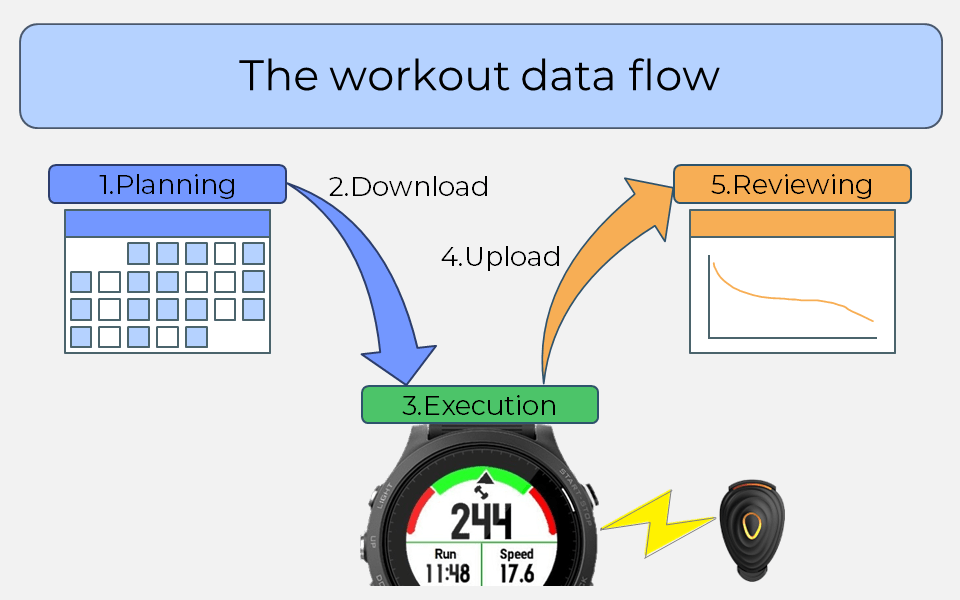
You’ll need apps for each of the 5 steps. With the right combination (matched to your equipment), you can minimise manual effort and focus on your running. With the wrong combination, you may add manual effort or struggle to make things work.
Combinations proven to work together are covered in Running with Power – Getting Started.
Apps for Running with Power
The following table lists apps that support running with power. This isn’t an exhaustive list – it’s a list of apps I’ve used and can confirm their functionality.
The table headers show workout step, and a single letter representing functionality an app might provide related to the workout step. These are explained in the ‘Comparison Criteria’ below the table.
The body of the table shows whether each app has a component providing that functionality, and if so, whether it’s:
- F: Free to use
- D: Free to use, but if you like it and use it you can Donate to support the developer
- $: Functionality is available for a $ubscription
- P: Functionality is available for a one-time Payment
Some apps provide Paid components with a subset for Free – these are in the table as F$ or FP
For more detail about the functionality provided by each app (as measured by the comparison criteria), click on the app name.
|
App |
1.P |
1.C |
2.D |
3.P |
3.G |
4.U |
5.W |
5.M |
5.E |
6.C |
|---|---|---|---|---|---|---|---|---|---|---|
|
F$ |
$ |
F |
– |
– |
F |
F |
F$ |
F$ |
F |
|
|
– |
– |
F |
F |
F |
F |
– |
– |
– |
– |
|
|
$ |
$ |
F |
– |
– |
F |
F |
F$ |
– |
$ |
|
|
– |
– |
– |
– |
– |
F |
P |
P |
– |
P |
|
|
P |
F |
F |
– |
– |
F |
F |
– |
– |
$ |
|
|
– |
D |
D |
– |
– |
D |
D |
D |
– |
D |
|
|
– |
– |
– |
– |
– |
– |
– |
F |
F |
– |
|
|
– |
F |
$ |
F |
F |
$ |
F |
– |
– |
– |
|
|
– |
P |
P |
P |
P |
P |
P |
– |
– |
– |
|
|
– |
F |
F |
F |
F |
F |
– |
– |
– |
– |
|
|
– |
– |
– |
– |
– |
P |
P |
– |
– |
– |
|
|
– |
– |
F |
D |
D |
F |
– |
– |
– |
– |
Comparison Criteria
The table headings refer to the following comparison criteria:
- 1.P – Plans. Are there power-based training plans for various event distances/experience levels? Or can you connect to a coach who can provide planned workouts?
- 1.C – Customisation. Can you adjust training plans, create your own plans, and build your own workouts?
- 2.D – Download. Can planned workouts be downloaded for execution?
- 3.P – Power. Can you choose various ways to display power while running, at a minimum: real-time power; lap power? Can you display power in Watts/kg or as a percentage or threshold power?
- 3.G – Guided workouts. Can the app guide you through a structured workout – a workout with multiple steps, each with their own target and duration?
- 4.U – Upload. Can completed workouts be uploaded for reviewing?
- 5.W – Workout review. Can you review workout summary data and detailed (per second) workout data? Can you review workout compliance (actual vs. target)?
- 5.M – Metrics. Does the app provide power metrics, at a minimum: threshold power; stress balance; a power-duration curve? Does it also provide ramp rate or running effectiveness?
- 5.E – Events. Does the app offer a way to calculate power targets for upcoming events and races?
- 6.C – Coaching. Is it possible to coach athletes using the app, at a minimum: multiple athletes, reviewing results/metrics? Can you also provide planned workouts, or communicate with your athletes?
Need help setting things up?
App settings & configs are online too!
Or you can ask for help in the from1runner2another Facebook group.
I’m curious – what’s in the book?
Running with Power – Getting Started has three parts:
- Equipment & Apps. Part 1 outlines combinations of equipment and apps that will work together, along with the advantages and disadvantages of each, so that you can make the best choice for you. It outlines settings you should use (for every watch/power meter combination), and provides example equipment/app combinations illustrating how to connect things to minimise manual steps. The content of this page (and the detailed app pages) are included in Part 1 of the book.
- Running with Power. Part 2 covers the fundamental concepts of Running with Power, using a practical approach with opportunities to experience different aspects of power … by running with power. A learning-by-doing approach is an effective way to learn, and part 2 contains several activities you can use to experience the concepts, along with questions to help you reflect on the experience.
- Setups & Configs. Available online, part 3 covers settings for watch and power meter combinations, including settings that apply to every combination and settings specific to the combination, and covers the setup of popular apps, including setting up the app to app connections and using the apps for individual workouts or to review multi-workout metrics.
I have some feedback, or a question
If you have feedback or a question, please let me know in the from1runner2another Facebook group.
Updated: