Getting Started – Power=Consistent Progress

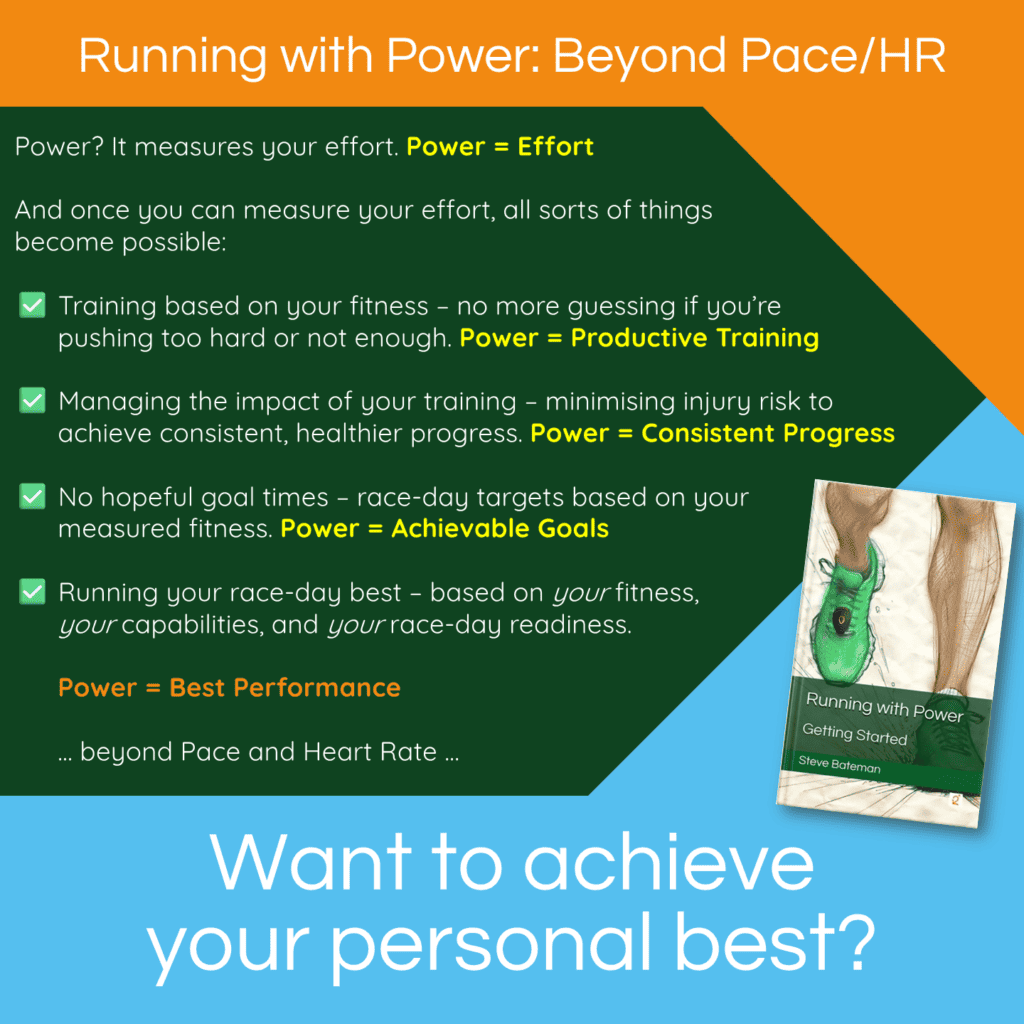
Graphic showing proposed back cover content for the Getting Started book

To celebrate the upcoming release of the Spanish version of ‘Getting Started’, I’m planning to update the cover of the English version too. This text (on the green background) will be on the back cover of the books (in the appropriate language) and in the book blurb on reseller websites.

This week, I’m posting about each of the ‘Power =’ items 🙂

𝐏𝐨𝐰𝐞𝐫 = 𝐂𝐨𝐧𝐬𝐢𝐬𝐭𝐞𝐧𝐭 𝐏𝐫𝐨𝐠𝐫𝐞𝐬𝐬

Power identifies training targets, based on your fitness, that maximise training results while minimising over-training and risking injury, enabling consistent, uninterrupted progress toward your target event.

This raises two questions:

  1. How does power maximise training results?
  2. How does power minimise over-training and risking injury?

𝐇𝐨𝐰 𝐝𝐨𝐞𝐬 𝐩𝐨𝐰𝐞𝐫 𝐦𝐚𝐱𝐢𝐦𝐢𝐬𝐞 𝐭𝐫𝐚𝐢𝐧𝐢𝐧𝐠 𝐫𝐞𝐬𝐮𝐥𝐭𝐬?

Power enables more precise training targets, using targets relative to your Threshold Power (your current fitness) and that are often just a narrow range of a few percentage points of your Threshold Power.

Which means:
✅ power targets are easier to achieve than pace or HR targets – just ‘run to the numbers’
✅ you’re more likely to target the specific adaptations needed for your goal race
✅ as your fitness improves, your targets automatically adjust to match your increased capability

In other words, Power = Productive Training.

𝐇𝐨𝐰 𝐝𝐨𝐞𝐬 𝐩𝐨𝐰𝐞𝐫 𝐦𝐢𝐧𝐢𝐦𝐢𝐬𝐞 𝐨𝐯𝐞𝐫-𝐭𝐫𝐚𝐢𝐧𝐢𝐧𝐠 𝐚𝐧𝐝 𝐫𝐢𝐬𝐤𝐢𝐧𝐠 𝐢𝐧𝐣𝐮𝐫𝐲?

Power calculates a Training Load Score for each completed workout, based on the workout’s duration and range of intensities.

These scores can be combined (using research-backed maths) to provide a number of metrics used to monitor your Training Load – the cumulative impact of your training on your body.

The three most important are:
✅ a Training Load Balance, indicating the current balance between shorter-term and longer-term training impacts, so your training can maintain a productive balance between the two
✅ a Ramp Rate, indicating how quickly your training is adding load, so that you can add load safely
✅ a Training Intensity Distribution, showing how much time you’re spending at different intensities, to target the right mix of training for your upcoming event

𝐂𝐨𝐧𝐬𝐢𝐬𝐭𝐞𝐧𝐭 𝐏𝐫𝐨𝐠𝐫𝐞𝐬𝐬

By maintaining a productive balance, adding load safely and precisely targeting the right mix of intensities, you can:
⚡ maximise your training results, and,
⚡ minimise your risk of over-training and injury.

Which means consistent, uninterrupted progress toward your upcoming event.

𝑺𝒉𝒐𝒖𝒍𝒅𝒏’𝒕 𝒚𝒐𝒖 𝒃𝒆 𝑹𝒖𝒏𝒏𝒊𝒏𝒈 𝒘𝒊𝒕𝒉 𝑷𝒐𝒘𝒆𝒓?

Questions?
📖 Getting Started

Getting Started – Power=Productive Training

Graphic showing proposed back cover content for the Getting Started book

To celebrate the upcoming release of the Spanish version of ‘Getting Started’, I’m planning to update the cover of the English version too. This text (on the green background) will be on the back cover of the books (in the appropriate language) and in the book blurb on reseller websites.

This week, I’m posting about each of the ‘Power =’ items 🙂

𝐏𝐨𝐰𝐞𝐫 = 𝐏𝐫𝐨𝐝𝐮𝐜𝐭𝐢𝐯𝐞 𝐓𝐫𝐚𝐢𝐧𝐢𝐧𝐠

Power identifies training targets, based on your fitness, that maximise training results while minimising over-training and risking injury.

Which raises two questions:

  1. How does power identify your running fitness?
  2. How does power set training targets based on your fitness?

𝐇𝐨𝐰 𝐝𝐨𝐞𝐬 𝐩𝐨𝐰𝐞𝐫 𝐢𝐝𝐞𝐧𝐭𝐢𝐟𝐲 𝐲𝐨𝐮𝐫 𝐫𝐮𝐧𝐧𝐢𝐧𝐠 𝐟𝐢𝐭𝐧𝐞𝐬𝐬?

Second-by-second as you run, power provides numbers representing your effort.

With a few maximum effort runs (no lab testing needed), you can identify your Threshold Power.

Threshold Power is an important representation of your current running fitness.

𝐇𝐨𝐰 𝐝𝐨𝐞𝐬 𝐩𝐨𝐰𝐞𝐫 𝐬𝐞𝐭 𝐭𝐫𝐚𝐢𝐧𝐢𝐧𝐠 𝐭𝐚𝐫𝐠𝐞𝐭𝐬 𝐛𝐚𝐬𝐞𝐝 𝐨𝐧 𝐲𝐨𝐮𝐫 𝐟𝐢𝐭𝐧𝐞𝐬𝐬?

Power uses your Threshold Power as an anchor, positioned at 100% on a scale from 60-65% (no longer walking) up through 200% (short sprints) and beyond.

For example, you might use the following training targets:
🔹 80% or less for an easy run
🔹 94-96% for 10-20 minute intervals at half-marathon power
🔹 102-105% for 3-minute VO2max intervals

And if (when) your fitness improves and your Threshold Power increases, your workout targets adjust to match the new anchor, matching your increased fitness.

𝐖𝐡𝐲 𝐮𝐬𝐞 𝐓𝐡𝐫𝐞𝐬𝐡𝐨𝐥𝐝 𝐏𝐨𝐰𝐞𝐫? 𝐖𝐡𝐲 𝐧𝐨𝐭 𝐮𝐬𝐞 𝐕𝐎𝟐𝐦𝐚𝐱?

VO2max is a measure of your body’s maximum aerobic capacity. Threshold Power is the highest intensity you can maintain without rapidly fatiguing and needing to slow down or stop.

Think of VO2max as ‘the size of your engine’, and Threshold Power as ‘your highest cruising speed’. A bigger VO2max means you could go further and faster, but it doesn’t mean you’ll use that capacity effectively; a higher cruising speed means you can travel faster for a sustained period of time.

Both are important, but of the two, threshold power is more actionable, and a more direct and practical predictor of endurance performance.

𝐈𝐬 𝐢𝐭 𝐨𝐧𝐥𝐲 𝐚𝐛𝐨𝐮𝐭 𝐭𝐡𝐞 𝐧𝐮𝐦𝐛𝐞𝐫𝐬?

No.

Training is much more than actions driven by numbers. But training should also be underpinned by quantitative data – and power can provide those numbers.

𝑺𝒉𝒐𝒖𝒍𝒅𝒏’𝒕 𝒚𝒐𝒖 𝒃𝒆 𝑹𝒖𝒏𝒏𝒊𝒏𝒈 𝒘𝒊𝒕𝒉 𝑷𝒐𝒘𝒆𝒓?

Questions?
📖 Getting Started

Getting Started – Power=Productive Training

Max efforts are hard – is there any alternative?

Hand raised to ask a question

𝐌𝐚𝐱 𝐄𝐟𝐟𝐨𝐫𝐭 𝐫𝐮𝐧𝐬 𝐚𝐫𝐞 𝐡𝐚𝐫𝐝 – 𝐢𝐬 𝐭𝐡𝐞𝐫𝐞 𝐚𝐧𝐲 𝐚𝐥𝐭𝐞𝐫𝐧𝐚𝐭𝐢𝐯𝐞?

This is a common experience for runners new to power.

A Maximum Effort run is a run at the maximum (average) power you can maintain for a specific duration.

For example, your 3-minute max is the highest average power you can maintain over a 3-minute run.

𝐖𝐡𝐲 𝐝𝐨 𝐭𝐡𝐞𝐦?

👉🏼 By running max efforts over two or more durations (e.g. 3-minutes and 12-minutes) you can calculate your Threshold Power.

❓ Without max efforts, you won’t truly know what you’re capable of, and your training targets, training load and race/event targets will probably be understated.

𝐈𝐬 𝐭𝐡𝐞𝐫𝐞 𝐚𝐧𝐲 𝐚𝐥𝐭𝐞𝐫𝐧𝐚𝐭𝐢𝐯𝐞?

Yes.

💉 You can pay for lactate testing. But this typically involves a graded exercise test with increasing intensity every few minutes (max efforts in disguise).

🧮 You can estimate your Threshold Power using easy runs, but this method is only recommended until you’re able to complete maximum effort runs.

𝐃𝐨 𝐭𝐡𝐞𝐲 𝐠𝐞𝐭 𝐞𝐚𝐬𝐢𝐞𝐫?

They do … and they don’t.

❌ They don’t because you’re running at the highest average power you can manage – that’s never going to be easy. And it’s typical to start out too fast and fade towards the end, which may mean you didn’t really run to your maximum.

✅ And they do. You get used to how they feel. You get used to starting out a little slower, then pushing it towards the end. And you can use previous max effort results to gauge how hard to run the first part of your upcoming max effort.

And then you realise (in the words of Dr Andrew Coggan) ‘testing is training, too’.

𝑺𝒉𝒐𝒖𝒍𝒅𝒏’𝒕 𝒚𝒐𝒖 𝒃𝒆 𝑹𝒖𝒏𝒏𝒊𝒏𝒈 𝒘𝒊𝒕𝒉 𝑷𝒐𝒘𝒆𝒓?

Questions?
📖 Getting Started

Max efforts are hard – is there any alternative?

How can I run faster?

Hand raised to ask a question

𝐇𝐨𝐰 𝐜𝐚𝐧 𝐈 𝐫𝐮𝐧 𝐟𝐚𝐬𝐭𝐞𝐫?

This is a common question that many runners ask, and not just runners using power.

There are three ways that you can run faster:
✅ Improve your fitness. If you’re fitter, you should be able to maintain a higher effort, which should mean a higher pace and a quicker finish time.
✅ Improve your form. If you improve how you run, you should be able to run faster for the same effort, resulting in a quicker finish time.
✅ Improve both. Although it’s much easier to improve your fitness than to improve your form 😊

𝐇𝐨𝐰 𝐜𝐚𝐧 𝐲𝐨𝐮 𝐢𝐦𝐩𝐫𝐨𝐯𝐞 𝐲𝐨𝐮𝐫 𝐟𝐢𝐭𝐧𝐞𝐬𝐬?

By training.

Ideally, using a training plan that includes both running and strength or other supplementary workouts, as well as recovery time.

Strength or other supplementary workouts will improve (or maintain) your whole-body fitness.

Recovery gives your body time to respond to the training – it’s when you become fitter.

You can measure fitness improvements using your Threshold Power.

𝐇𝐨𝐰 𝐜𝐚𝐧 𝐲𝐨𝐮 𝐢𝐦𝐩𝐫𝐨𝐯𝐞 𝐲𝐨𝐮𝐫 𝐟𝐨𝐫𝐦?

Using drills, plyometrics, hill runs and other activities that work on leg spring stiffness.

You might also try specific interventions (under the supervision of a running physio or specialist running coach), but these are much harder to embed.

You can measure form improvements using Running Effectiveness.

Power provides specific metrics you can use to track improvements in fitness and in form.

𝑺𝒉𝒐𝒖𝒍𝒅𝒏’𝒕 𝒚𝒐𝒖 𝒃𝒆 𝑹𝒖𝒏𝒏𝒊𝒏𝒈 𝒘𝒊𝒕𝒉 𝑷𝒐𝒘𝒆𝒓?

Questions?
📖 Getting Started

Power Apps – point solutions

Power apps - calculating metrics

𝐏𝐨𝐰𝐞𝐫 𝐀𝐩𝐩𝐬 – 𝐩𝐨𝐢𝐧𝐭 𝐬𝐨𝐥𝐮𝐭𝐢𝐨𝐧𝐬

Power is still relatively new for runners. And while there are some apps that cover most of the important metrics, you may find that you need additional apps to plug the gaps.

Here are a few apps that can fill those gaps.

𝐔𝐬𝐢𝐧𝐠 𝐀𝐩𝐩𝐥𝐞 𝐰𝐫𝐢𝐬𝐭-𝐛𝐚𝐬𝐞𝐝 𝐩𝐨𝐰𝐞𝐫

Apple Health doesn’t provide any of the important metrics.

Which means you’ll need to transfer your workout data from Apple Health into an app that can provide these, like WKO or Intervals.icu.

There are a few apps that will do this. I’ve successfully used HealthFit; other options are RunGap or Health Sync.

𝐑𝐮𝐧𝐧𝐢𝐧𝐠 𝐄𝐟𝐟𝐞𝐜𝐭𝐢𝐯𝐞𝐧𝐞𝐬𝐬 (𝐑𝐄)

The only app to provide this (natively) is WKO.

If you’re a Stryd user, or if you’re using Intervals.icu, you’ll need to calculate RE manually or use SuperPower Calculator for Sheets (SPCs).

Steve Palladino’s video ‘Running Effectiveness and the SuperPower Calculator’ demonstrates how to use SPCs to calculate RE for a workout or a workout section.

𝐎𝐭𝐡𝐞𝐫 𝐚𝐩𝐩𝐬

‘Getting Started’ covers other apps that can calculate power metrics, while the book’s online content provides a more complete comparison of Power Apps.

𝑺𝒉𝒐𝒖𝒍𝒅𝒏’𝒕 𝒚𝒐𝒖 𝒃𝒆 𝑹𝒖𝒏𝒏𝒊𝒏𝒈 𝒘𝒊𝒕𝒉 𝑷𝒐𝒘𝒆𝒓?

Questions?
📖 Getting Started

point solutions

Power Apps – Intervals.icu

Power apps - calculating metrics

𝐏𝐨𝐰𝐞𝐫 𝐀𝐩𝐩𝐬 – 𝐈𝐧𝐭𝐞𝐫𝐯𝐚𝐥𝐬.𝐢𝐜𝐮

Intervals.icu analyses your rides, runs, swims and other activities (with and without power). It provides basic and advanced analytics and planning in an easy-to-use web interface with support for desktops, phones, and tablets. Intervals.icu is free to use, with additional features should you choose to subscribe.

It can calculate and display all the most important metrics … and then some.

𝐈𝐧𝐭𝐞𝐫𝐯𝐚𝐥𝐬.𝐢𝐜𝐮 𝐌𝐞𝐭𝐫𝐢𝐜𝐬

✅ Threshold Power. Intervals.icu can calculate threshold power (using your choice from several models) based on the last 90 days of completed workouts or using a custom date range.

✅ Stress Score. Intervals.icu uses the term ‘Training Stress Score’ (TSS) and can calculate a power-based TSS for each completed workout.

✅ Stress Balance. Intervals.icu uses the term ‘Form’ to show the balance between ‘Fitness’ and ‘Fatigue’.

✅ Ramp Rate. Intervals.icu shows your week-on-week Ramp Rate (RR), overlaid onto the same chart as fitness, fatigue and form.

✅ Running Effectiveness. Intervals.icu doesn’t calculate Running Effectiveness, although you can manually calculate this using the detailed workout review pages, or by adding a custom calculation.

𝐖𝐡𝐲 𝐮𝐬𝐞 𝐈𝐧𝐭𝐞𝐫𝐯𝐚𝐥𝐬.𝐢𝐜𝐮?

If you’re not using the Stryd ecosystem or TrainingPeaks/WKO, Intervals.icu is a great way to track your power metrics.

Getting Started’ covers other apps that can calculate power metrics, while the book’s online content provides a more complete comparison of Intervals.icu vs. other Power Apps.

𝑺𝒉𝒐𝒖𝒍𝒅𝒏’𝒕 𝒚𝒐𝒖 𝒃𝒆 𝑹𝒖𝒏𝒏𝒊𝒏𝒈 𝒘𝒊𝒕𝒉 𝑷𝒐𝒘𝒆𝒓?

Questions?
📖 Getting Started

WKO

Intervals.icu

Power Apps – WKO

Power apps - calculating metrics

𝐏𝐨𝐰𝐞𝐫 𝐀𝐩𝐩𝐬 – 𝐖𝐊𝐎

The WKO app is an analysis and charting tool that runs under MS Windows or on a Mac and provides a wide range of charts and graphs of your power data.

It can calculate and display all the most important metrics … and then some.

𝐖𝐊𝐎 𝐌𝐞𝐭𝐫𝐢𝐜𝐬

✅ Threshold Power. WKO uses the term ‘Functional Threshold Power’ (FTP) and offers an automatically calculated FTP, as well as the option to manually record your FTP history (and use it in charts).

✅ Stress Score. WKO uses the term ‘Training Stress Score’ (TSS).

✅ Stress Balance. WKO uses the term ‘Training Stress Balance’ (TSB).

✅ Ramp Rate. WKO can chart your week-on-week Ramp Rate (RR).

✅ Running Effectiveness. WKO can show your Running Effectiveness (RE) for an entire workout or just for part of a workout (e.g. an interval).

𝐖𝐡𝐲 𝐮𝐬𝐞 𝐖𝐊𝐎?

WKO comes with hundreds of pre-configured charts. You can also build your own charts and calculated metrics using a powerful charting language. WKO integrates seamlessly with TrainingPeaks, syncing planned and completed workout data and a range of health metrics.

Getting Started’ covers other apps that can calculate power metrics, while the book’s online content provides a more complete comparison of WKO vs. other Power Apps.

𝑺𝒉𝒐𝒖𝒍𝒅𝒏’𝒕 𝒚𝒐𝒖 𝒃𝒆 𝑹𝒖𝒏𝒏𝒊𝒏𝒈 𝒘𝒊𝒕𝒉 𝑷𝒐𝒘𝒆𝒓?

Questions?
📖 Getting Started

Power Apps – Stryd PowerCenter / Stryd Mobile

Power apps - calculating metrics

𝐏𝐨𝐰𝐞𝐫 𝐀𝐩𝐩𝐬 – 𝐒𝐭𝐫𝐲𝐝 𝐏𝐨𝐰𝐞𝐫𝐂𝐞𝐧𝐭𝐞𝐫 / 𝐒𝐭𝐫𝐲𝐝 𝐌𝐨𝐛𝐢𝐥𝐞

The Stryd PowerCenter / Mobile app is available to anyone using a Stryd footpod (most features are free, some need a subscription).

It calculates and displays some (but not all) of the most important metrics.

𝐒𝐭𝐫𝐲𝐝 𝐌𝐞𝐭𝐫𝐢𝐜𝐬

In the following, the term ‘Stryd’ includes Stryd PowerCenter and Stryd Mobile

✅ Threshold Power. Stryd uses the term ‘Critical Power’ (CP) and offers an automatically calculated CP (Auto-CP) as well as a manually-set CP (using various protocols).

✅ Stress Score. Stryd uses the term ‘Running Stress Score’ (RSS) and offers a unique calculation which includes a term representing the additional biomechanical stress put on your body from running (vs. cycling).

✅ Stress Balance. Stryd uses the term ‘Running Stress Balance’ (RSB) and offers guidance for how to interpret your RSB.

❌ Ramp Rate. Stryd does not show your Ramp Rate (RR). You’ll need to calculate RR manually using Stryd’s 42d Avg (in Stryd Mobile) or use another system to track this.

❌ Running Effectiveness. Stryd does not show your Running Effectiveness (RE). You’ll need to calculate RE manually using another system, or use one of Stryd’s alternate metrics – for example Form Power, Leg Spring Stiffness, Impact Loading Rate.

𝐖𝐡𝐲 𝐮𝐬𝐞 𝐒𝐭𝐫𝐲𝐝 𝐏𝐨𝐰𝐞𝐫𝐂𝐞𝐧𝐭𝐫𝐞 / 𝐌𝐨𝐛𝐢𝐥𝐞?

The Stryd ecosystem is probably the most power-friendly app at the moment, designed with power in mind, and aimed at runners who are getting started with power.

Getting Started’ covers systems that can calculate the missing metrics, while the book’s online content provides a more complete comparison of Stryd vs. other Power Apps.

𝑺𝒉𝒐𝒖𝒍𝒅𝒏’𝒕 𝒚𝒐𝒖 𝒃𝒆 𝑹𝒖𝒏𝒏𝒊𝒏𝒈 𝒘𝒊𝒕𝒉 𝑷𝒐𝒘𝒆𝒓?

Questions?
📖 Getting Started

⏪ Choosing Power Apps

Stryd PowerCenter / Stryd Mobile

WKO

Choosing Power Apps

Power apps - calculating metrics

𝐂𝐡𝐨𝐨𝐬𝐢𝐧𝐠 𝐩𝐨𝐰𝐞𝐫 𝐚𝐩𝐩𝐬

Power is a complete system using effort as its fundamental metric.

Power uses your second-by-second effort from completed workouts to calculate metrics that build a detailed picture of your individual running capabilities.

Imagine you run 3 times per week for around an hour each time. That’s 60 pieces of data per minute, 3600 per hour and over 3 runs, over 10,000 pieces of data. That’s a lot of data!

Which is why power relies on power-aware applications (‘apps’) to calculate your metrics.

𝐂𝐚𝐧 𝐲𝐨𝐮 𝐮𝐬𝐞 𝐚𝐧𝐲 𝐚𝐩𝐩?

The choice is yours, but some apps are more power-aware than others, with the best apps able to calculate the most important metrics.

𝐖𝐡𝐢𝐜𝐡 𝐦𝐞𝐭𝐫𝐢𝐜𝐬 𝐚𝐫𝐞 𝐦𝐨𝐬𝐭 𝐢𝐦𝐩𝐨𝐫𝐭𝐚𝐧𝐭?

✅ Threshold Power. Represents your current running fitness.

✅ Stress Score. A score (per workout) that combines ‘how hard?’ and ‘how long?’ to represent the workout’s metabolic stress – its impact on your body.

✅ Stress Balance. Indicates whether your training is ‘productive’  – enough stress to encourage adaptations, but not so much that there is a greater risk of injury or over-training.

✅ Ramp Rate. Replaces ‘the 10% rule’ with a metric based on your training volume and intensity, to monitor whether you’re adding training load too quickly.

✅ Running Effectiveness. Measures how effectively you convert power into speed, used to estimate finish times, to assess changes to your running form and to evaluate your fatigue resistance.

There are other criteria that will influence your choice of apps, but being able to obtain these metrics may be the most important.

𝑺𝒉𝒐𝒖𝒍𝒅𝒏’𝒕 𝒚𝒐𝒖 𝒃𝒆 𝑹𝒖𝒏𝒏𝒊𝒏𝒈 𝒘𝒊𝒕𝒉 𝑷𝒐𝒘𝒆𝒓?

Questions?
📖 Getting Started

Choosing Power Apps

Why Steve runs and coaches with power

Why Steve runs and coaches using power

𝐖𝐡𝐲 𝐝𝐨𝐞𝐬 𝐒𝐭𝐞𝐯𝐞, 𝐚 𝐔𝐊-𝐛𝐚𝐬𝐞𝐝 𝐫𝐮𝐧𝐧𝐞𝐫 𝐚𝐧𝐝 𝐜𝐨𝐚𝐜𝐡, 𝐮𝐬𝐞 𝐩𝐨𝐰𝐞𝐫?

There are two reasons:
⚡ The numbers match how hard you’re working … they just ‘feel right’
🎯 Targets (for training and racing) are based on you … power is personal

Let me unpack those.

𝐓𝐡𝐞 𝐧𝐮𝐦𝐛𝐞𝐫𝐬 𝐦𝐚𝐭𝐜𝐡 𝐡𝐨𝐰 𝐡𝐚𝐫𝐝 𝐲𝐨𝐮’𝐫𝐞 𝐰𝐨𝐫𝐤𝐢𝐧𝐠

Power provides numbers representing how hard you’re working while running – your effort.

Running by effort isn’t new – runners have used ‘Perceived Exertion’ for many years. What is new is being able to put numbers to your effort.

Are the numbers actionable?

YES, based on using power since 2018 … and on multiple independent studies.

𝐓𝐚𝐫𝐠𝐞𝐭𝐬 𝐚𝐫𝐞 𝐛𝐚𝐬𝐞𝐝 𝐨𝐧 𝐲𝐨𝐮

Once you can measure your effort, all sorts of things become possible – you can:
✅ assess your running fitness at any point in your training
✅ ensure your training stays productive by setting workout targets based on your current fitness, rather than on a hopeful goal time
✅ reduce your risk of injury using completed workouts to track your training load
✅ personalise your race-day targets to achieve the best result you’re capable of on the day

All of these are calculated using your completed workouts. Power really is Personal.

𝐖𝐡𝐚𝐭 𝐝𝐨𝐞𝐬 𝐭𝐡𝐢𝐬 𝐦𝐞𝐚𝐧 𝐟𝐨𝐫 𝐜𝐨𝐚𝐜𝐡𝐢𝐧𝐠?

Using my runners’ completed workouts, I can build a detailed profile of each runner based on what they can achieve (right now). And I can use that profile to set targets that are individual to each runner’s capability (right now), to get the most from their training while minimising injury risk.

I can do all of this virtually, to coach runners in the UK, the US, or any other place worldwide.

Power (and the system behind it) provides a science-backed, metrics-based, individualised approach to training and racing – for runners and for coaches.

𝑺𝒉𝒐𝒖𝒍𝒅𝒏’𝒕 𝒚𝒐𝒖 𝒃𝒆 𝑹𝒖𝒏𝒏𝒊𝒏𝒈 𝒘𝒊𝒕𝒉 𝑷𝒐𝒘𝒆𝒓?

Questions?
📖 Getting Started

Why Steve runs and coaches with power